50megs Login with Handy Password
Login to 50megs member area automatically with a handy password manager.
To login to 50megs Member Area with a single click, please do the following:
- Download password manager;
- Turn on Handy Password toolbar in Internet Explorer/Firefox;
- Go to the members.50megs.com/cgi-bin/members;
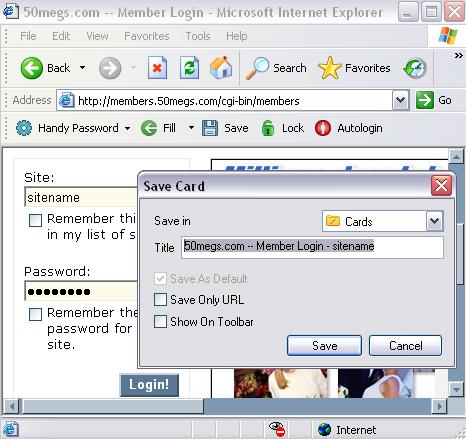
- Type in login form your sitename and password;
- Click the "Save" button on the Handy Password toolbar;
- Check the "Show on Toolbar" checkbox in the opened "Save card" dialog;
- Press "Enter".
From now, to login to 50megs Member Area automatically, just click on the "50megs.com" button on the Handy Password toolbar.
Handy Password is also called a bookmark manager, because "50megs.com -- Member Login" button appears on button appears on IE or Firefox browser toolbar like bookmark and contains not only filled form fields, but also a site url, so you can at once enter a site and login to it.
Read about automatic login, autosave passwords and other features of Handy Password.
See also:
Lunarpages account management login
Site5 account login
GeoCities account login
Back to Screenshots List
 |  |  |
















