Handy Password manager Version History
Version 4.8
The new version of Handy Password 4.8 has the best compatibility with Windows 7, which is the most powerful and stable operating system in Microsoft family. The new Windows 7 password manager delivers an easy way to manage personal and corporative passwords, and has a number of improvements in general performance.
Version 4.6
Web password manager Handy Password has been updated to the new version. Several considerable improvements have been made for your confidence and pleasure. More stable work in general, and particularly in OS Windows Vista, aims to provide comfortable and nice password management. The useful function of multi-authorization is realized: login and password from one service can be now used to auto login to all services within the same domain.
Version 4.5.6
In the new version we managed to reach new level in stability: the interaction with any other Internet Explorer and Mozilla toolbar was debugged. Handy Password login manager now can make form filling process more flexible and convenient: a form on the web page the card has been created for is automatically filled even if it in spite of its partial changing.
Version 4.5.4
Handy Password is a multifunctional password manager with a multi-user password database, combined with a form filler and a bookmark manager. In new 4.5.4 version, we successfully fixed several issues and made graphical user interface even more simple and effective:
- Trial information window appearance was improved as well as instructions for novice users;
- Last version 3.5 of Mozilla Firefox is now supported correctly;
- Generally, application achieved a new level of stability.
Version 4.5
To make Handy Password even more useful password manager, it was enhanced with password recovery feature. From now on, Handy Password can be categorized as efficient password recovery software.
Version 4.4
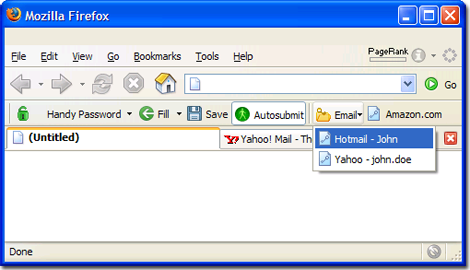
Handy Password browser toolbar was enhanced with full Mozilla Firefox 3 support, one of the most popular web browsers around the Globe. Mozilla Firefox 3 toolbar became available for users, allowing automatic saving, filling and submitting of logins, passwords and other web forms.
Version 4.3
Handy Password functionality has been extended with the multi-user access to password database. Now you can access the password database with the administrator rights or user rights. This feature allows using Handy Password in a corporate environment where multiple users can login to corporate accounts without knowing account passwords.
Version 4.1.0
To achieve maximum efficiency of the program, we have expanded its functionality with the new feature -
USB drive compatibility. The feature allows you to install Handy Password directly to USB flash drive and use it on any machine with the USB connection.
Version 4.0.5
- Handy Password is compatible now with Microsoft's Windows Vista.
- Improved compatibility with Internet Explorer and Mozilla Firefox.
Version 4.0.1
- Bug in autosubmit for IE plugin has been fixed.
Version 4.0
New functionality added – database on the email server:
- Exportable database on the email server. The new functionality allows keeping the database with your personal information on the email server. With your database saved on the mail server, you can always download it and use it on any computer where Handy Password is installed and not only you home or work PC.
Version 3.9.3
Some general improvements have been made. Improved features include:
- Database management has been improved. Now it can work efficiently with several databases.
- You can see the title of the database that you are currently using in the application window.
- "Card" menu added to the main menu.
- Card search has been greatly improved.
- More user-friendly procedure of password changing.
- Password generator can generate 20-digit passwords for still higher security.
- Improved compatibility with Internet Explorer 7 and Mozilla Firefox.
Version 3.9.2
- Handy Password 3.9.2 has an improved functionality and is now compatible with Internet Explorer 7.0.
Version 3.9
- Handy Password is compatible with Mozilla Firefox now and its toolbar is integrated in the browser. All web forms may be opened and automatically filled in Mozilla Firefox.
- Also, the new feature "Clear Fields" is available for Mozilla Firefox browser users. It allows clearing the form in one click if a wrong card with login information for filling in was chosen.
 |
Firefox context menu: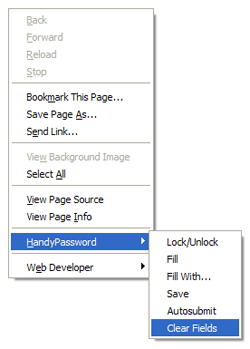 |
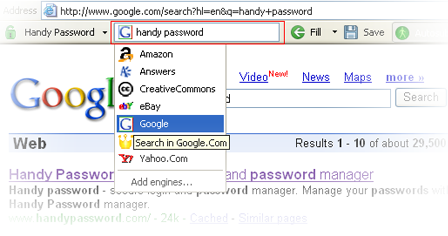
- New interface element: the web search toolbar. The new feature enables users to run Internet search engines by simple typing keywords in the box without direct addressing to the server webpage.
 Version 3.7
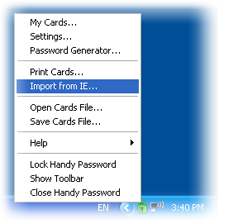
- Function "Import Internet Explorer Passwords": data import from the Internet Explorer browser cache to a Handy Password database and Internet Explorer cache flush.
Version 3.6
- Improved usability
Version 3.5
- Improved design and usability.
Version 3.4
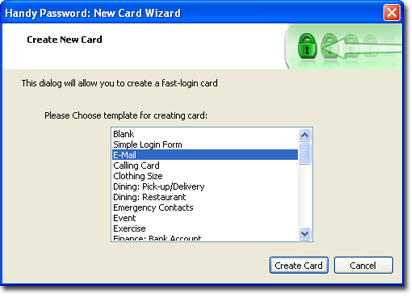
- Offline cards: templates for a convenient entry of data - creation of cards without using password keeper.
- Function "Drag-n-drop": passwords, logins and other data are moved using a mouse from Handy Password database to web forms in the Internet Explorer or Mozilla Firefox browsers.
Version 3.3
- Improved design and usability.
Version 3.2
- AutoSave function: the program will save form details automatically
- Form filler: the program will fill forms automatically
Version 3.1
- Can create cards to login to popular mail services easily
Version 3.0 and 2.4 FREE:
- New Installation wizard was added
- Handy Password was fully divided into Shareware and free version that available for download in two individual programs.
 Version 2.3.0:
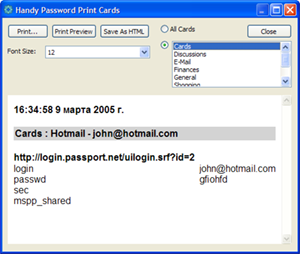
- Print Cards:
An ability to print Cards was added. - Improvements: Improved design and usability.
Version 2.2.0:
- Bookmark manager:

Now you can login to your favorite sites with only one click from Handy Password toolbar.
You can use the toolbar as an efficient replacement of the IE "Links" toolbar.
More about bookmarks...
- Improvements: Filling and submitting functions were improved.
Version 2.1.0:
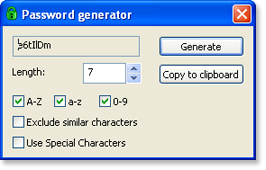 Password generator:
Random password generator creates 4-20 symbol random passwords. You can use upper and lower case letters, numbers and special symbols for password generation.
Version 2.0.0:
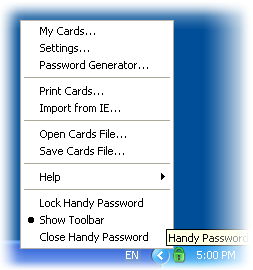 Tray Agent: Handy Password can now be manipulated from its system tray agent.
It allows performing the same actions as in the Handy Password dropdown menu.
It is even possible to open the Edit Cards and Settings windows without an IE window opened.
Also, one can close the Handy Password from the system tray.
Tray Agent: Handy Password can now be manipulated from its system tray agent.
It allows performing the same actions as in the Handy Password dropdown menu.
It is even possible to open the Edit Cards and Settings windows without an IE window opened.
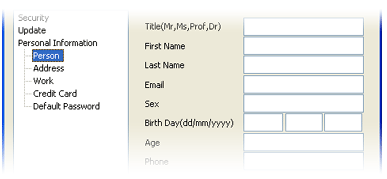
Also, one can close the Handy Password from the system tray.- Fill forms with personal information: It is now possible save identity information in Handy Password to fill in certain forms.
 Version 1.4.0:
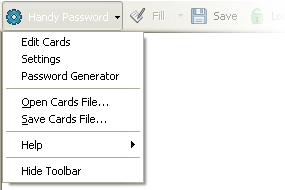
- Main menu: The main button was replaced in the Main Menu. In the Main Menu it is possible to:
- Open the Control Window to edit the Cards (the Edit Cards option)
- Open the Settings window to modify the Security and Update settings
- Open or Save the Cards database quickly
- Access Help easily
- Hide the toolbar
- Saving and Filling: The Card saving and filling algorithm was improved. An ability to fill and save data on websites with frames has been added.
- Default Card: Now every URL must have its own "default" Card. The first Card, saved for an URL, automatically becomes the "default" one.
- Save and Fill buttons: If there are no Cards for an URL, the "Fill" button is disabled. If the page does not have any data to save, the "Save" button is disabled.
Version 1.3.0:
- Hot keys: It is possible to use the keyboard instead of the mouse to perform many commands. Using a keyboard allows the User to issue a command with a lightning speed!
- Interface languages: From now on Handy Password can communicate with you in the following languages:
- English
- Spanish
- French
- German
Version 1.2.0:
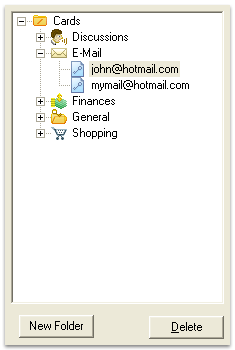 Folders: It is possible to perform a wide range of operations with Cards: they can be arranged into Folders (including default Folders: Discussions, E-mail, Finances, General and Shopping), can be displayed in a tree view and the Cards can be saved to a specific Folder upon saving.
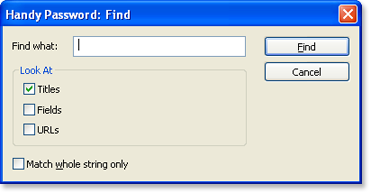
- Search: An ability to search Cards by name, field content and an URL has been added.
Version 1.1.2:
- The IE context menu items for saving and filling in the web forms and a lock Handy Password function were added.
Version 1.1.1:
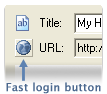
- The "Fast Login" button in Control Window was added:
- Some bugs were fixed.
Version 1.1.0:
- The "New" and the "Open" buttons in authorization dialog were added.
- Handy Password now opens the IE window after the installation and shows the toolbar.
- Some bugs with icons in XP style were fixed.
Version 1.0.0:
The first release of Handy Password Manager.
 |  |  |


















