Yahoo Small Business Login with Handy Password
Login to Small Business account management automatically with a handy password manager.
To login to Small Busness account management with a single click, please do the following:
- Download password manager;
- Turn on Handy Password toolbar in Internet Explorer/Firefox;
- Go to the Yahoo Small Business Sing In page;
- Type in your Yahoo ID and password;
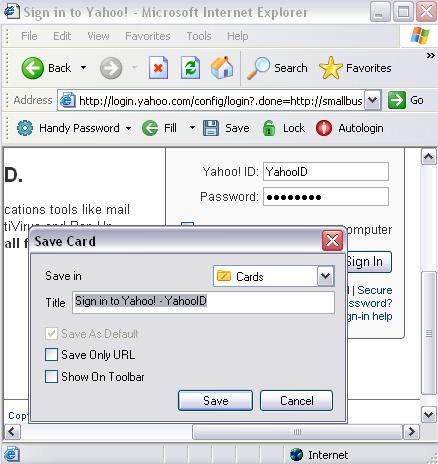
- Click the "Save" button on the Handy Password toolbar;
- Check the "Show on Toolbar" checkbox in the opened "Save card" dialog;
- Press "Enter".
From now, to login to Small Business account management automatically, just click on the "Sign in to Yahoo!" button on the Handy Password toolbar.
Handy Password is also called a bookmark manager, because "Sign in to Yahoo!" button appears on IE or Firefox browser toolbar like bookmark and contains not only filled form fields, but also a site url, so you can at once enter a site and login to it.
Read about automatic login, autosave passwords and other features of Handy Password.
See also:
Lunarpages account management login
Site5 account login
Back to Screenshots List
 |  |  |
















