Verizon Email Sign In: Easy Way
Verizon mail login is a significant constituent of well-known web platform that provides a useful internet services such as high speed internet, ability to pay bills, access to the news, video, ntertainment, sports and more. This article focuses on Verizon email sign on and tells you about the features of the use of this service, problem-solving configuration and instructions how to create Verizon account login.
Verizon Account Sign In
If you have not yet registered in my verizon webmail, you need to perform several steps:
- Click at "Register a new account" on the right side of the screen.
- Select the type of account that you prefer ("Wireless" suitable for smartphones, basic phones, tablets, and connected devices or "Residential" that is good for Internet, TV, and Home Phone).
- Enter your 10-digit mobile number. Or if you choose "Residential":
- Enter your personal data, such as:
- Verizon Home Phone Number;
- Last Bill Amount;
- Last Payment Amount;
- Verizon Account Number.
- Enter your personal data, such as:
- Complete the registration.
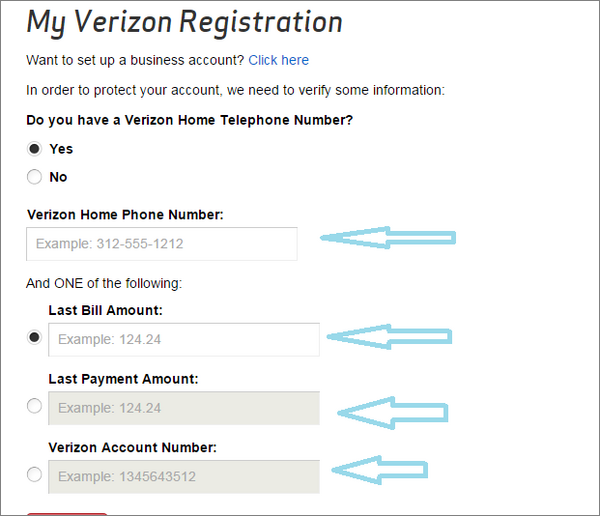
Images from webmail.verizon.com
Verizon Email Login: If You Forgot a Password
What to do if you forgot a password or User ID? Here you can find easy instructions that helps you restore password or User ID:
- Click at "Forgot a password or User ID" on the right side of the screen.
- Enter following information:
- Enter your User ID;
- Zip Code.
- Contact or Primary Email Address or Mobile Number;
- Zip Code.
Or if you forgot User ID:
Need a help?
If you still have any problems or questions about verizon.net sign in, account login or the system of Verizon mail, please contact the tech support of Verizon. You can get help in several ways:
- Email the tech support system (click at "support" at the top of the screen, then choose the category "Registration&Sign in" then write a question that bothered you.
- Ask in Community Forum (click at "support" at the top of the screen, then choose the category "Registration&Sign in" then click at theme which is more suitable for your problem).
- Contact tech support system by telephone number listed on the site.
- You can also connect tech support through your account on Facebook, Twitter, Google+ or YouTube.
We wish You a hassle-free use of Verizon email!
Verizon Mail: Login Automatically
Forgot your password? Verizonmail login? If you have more than one password, they are likely to be forgotten one day. Handy Password helps you to store all your passwords and another personal details in secure database. Handy Password works as an Internet Explorer and Firefox plug-in. It can remember all data for you and fill all forms automatically in a click.
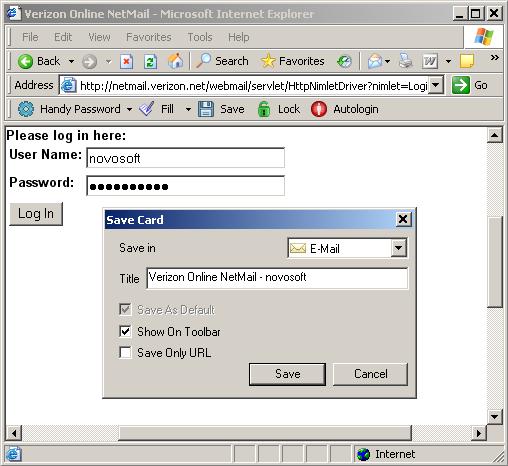
Login to your Verizon mail with a single click using a handy password manager.To login to Verizon mail automatically, please do the following:
- Download password manager;
- Turn on Handy Password toolbar in Internet Explorer/Firefox;
- Go to www.verizonmail.com;
- Type in your Verizon member name and password;
- Click the "Save" button on the Handy Password toolbar;
- Check the "Show on Toolbar" checkbox in the opened "Save card" dialog;
- Press "Enter".
From now, to login to your Verizon mail automatically, just click on the "VerizonMail.com" button on the Handy Password toolbar.
Handy Password is also called a bookmark manager, because "VerizonMail.com" button appears on IE or Firefox browser toolbar like bookmark and contains not only filled form fields, but also a site url, so you can at once enter a site and login to it.
Read about ways of usage, benefits or features of Handy Password.
USB password manager - you can run Handy Password directly from USB flash drive without installation on the computer. So that you can always have your passwords wherever you are.
 |  |  |
















