ADP Login: Easy Access to Your Account
ADP login is your starting point in the world of cloud-based Human Capital Management (HCM) helps you to improve your business in the sphere of HR, payroll, tax and benefits administration. You will learn from this article how get over the problems with ADP account and sign in system.
My ADP Login: Register a New Account
In order to create a new account in ADP portal you need to do the following steps:
- Choose on the main page of ADP official web site the section "User Logins" in the upper right corner of the screen.
- Click at "401k Plans - Employee Login >".
- Read carefully the terms of the agreement then click at "I agree".
- Click at "Register Now".
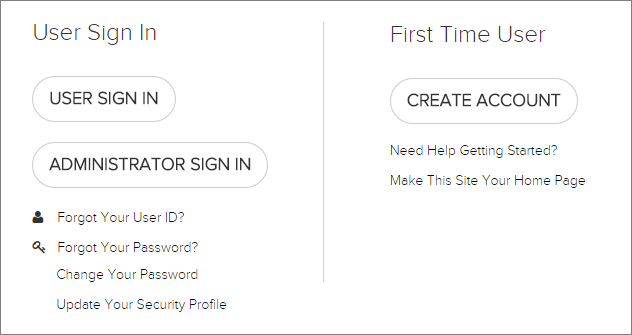
Images from www.adp.com
We would like to draw your attention that there is a division into Employee Login and Administration login (Choose the one that suits you):
- If you have, enter the registration code, if you do not have press "Continue".
- You need to enter your personal data, such as:
- First name;
- Last name;
- SSN, EIN, or ITIN;
- Date of Birth
- Complete the registration.
ADP Sign In: What to do if you forgot a password or User ID
If you forgot a password or User ID in your account, you need to enter the following personal information:
- Social Security Number;
- Date of Birth.
- Enter your User ID.
Or:
Also you can change your Personal Identification Number (PIN), to do so, you need to call the VRS and select the "Personalize Your PIN" option from the Main Menu of the official ADP web site.
Either you could read about ADP account login, ADP sign in and portal access in the section of “frequently asked questions” in the bottom of the screen.
Do You need a help with ADP Portal Sign in?
If you still have any question about ADP account login and registration you can write a message to the support team of ADP. To do this, simply click at "i Help & Support" and then fill the form (link to this on the right side of the screen in the section of "ADP Portal: Login & Support").
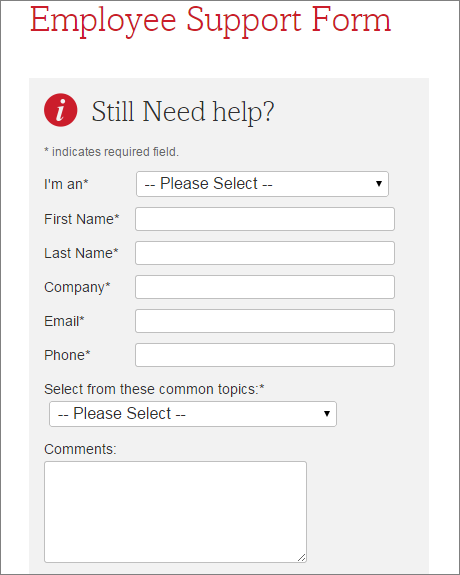
Also you can ask your question by phone 800-225-5237.
We wish you pleasant use of ADP account and the improvement of your HR management system!
ADP Myaccount Login: Login to ADP Account with a Single Click
Login to ADP Myaccount automatically with a Online Password manager.
To login to ADP account with a single click, please do the following:
- Download password manager;
- Turn on Handy Password toolbar in Internet Explorer/Firefox;
- Go to the www.adpmyaccount.com;
- Type in your ADP myaccount username and password;
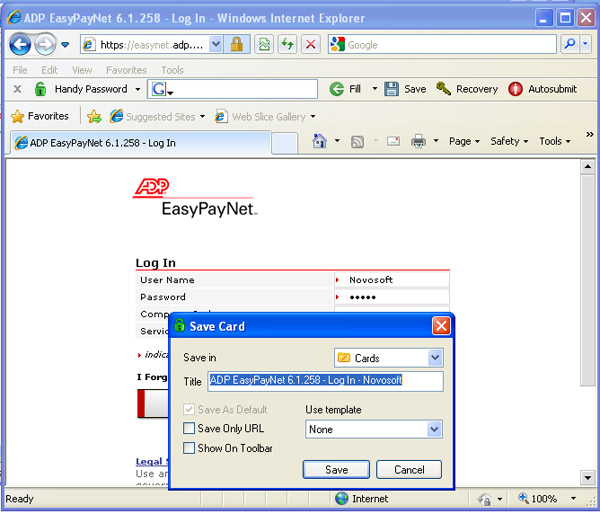
- Click the "Save" button on the Handy Password toolbar;
- Check the "Show on Toolbar" checkbox in the opened "Save card" dialog;
- Press "Enter".
From now, to login to ADP Myaccount automatically, just click on the "ADP Myaccount" button on the Handy Password toolbar.
Handy Password is also called a bookmark manager, because "ADP Myaccount" button appears on IE or Firefox browser toolbar like bookmark and contains not only filled form fields, but also a site url, so you can at once enter a site and login to it.
Read about ways of usage, benefits or features of Handy Password.
See also:
Yahoo mail login
Cox webmail login
Comcast mail login
 |  |  |
















