






Comerica Web Bank Login: Create an Account
Comerica web banking completely change your expectations about online banking and raise your business or personal matter on a high level. If you want to know how to log in Comerica web banking or if you have any problems with Comerica bank sign in, this article is what you need.
If you are a new to Comerica web, first of all you should sign up in Comerica web banking. In order to perform this task you should do the several steps:
- Choose on the main page of official Comerica bank web site the «Sign up» on the right side of the screen.
- Choose the one of the type of motivation in Comerica bank:
- Type of account relationship you would like (personal finance, small business);
- Type of online service you prefer (Comerica Web Banking and Bill Pay, Comerica Web Banking only).
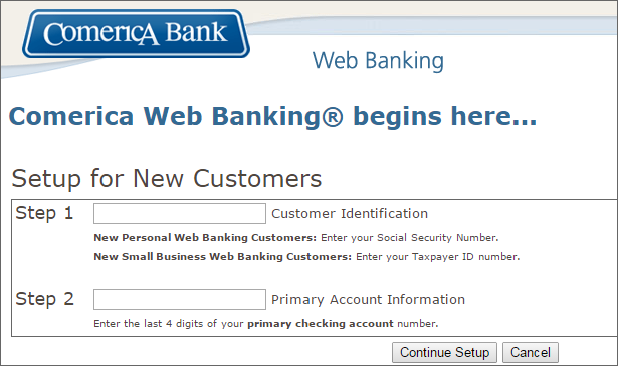
- Then you should enter your personal data, such as name, e-mail address, Social Security Number etc.
- You need to choose Web Banking account and additional Web Banking accounts.
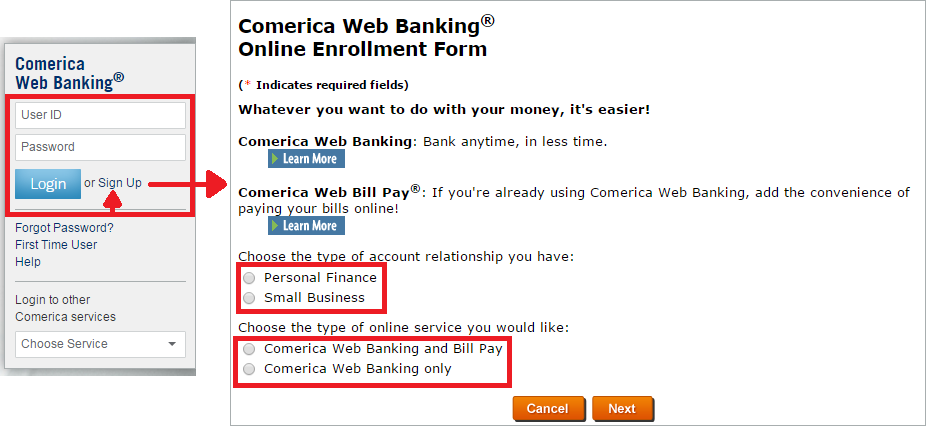
Images from www.comerica.com
If you faced any problems during performing the Online Enrollment Form, please click at «Help» in the upper right corner of the screen or on the main page of official Comerica bank web site.
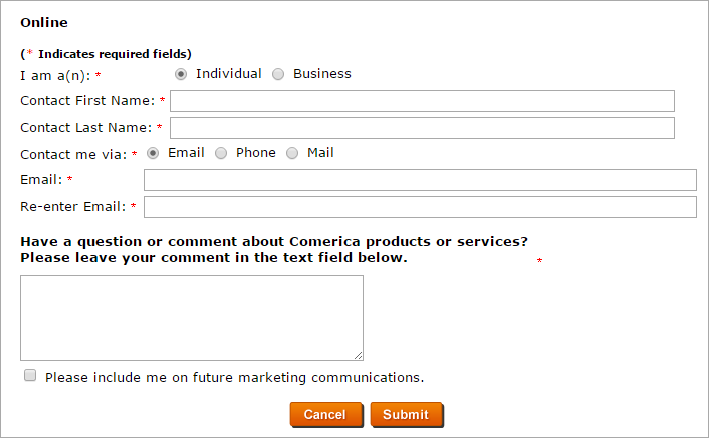
Also you can ask all the question which interests you with the help of online form of Comerica web banking:
- Click at «Contact us» at the top of the screen enter your personal information in the fields then write a question that worries you or contact the accounts department by calling the numbers listed in this section.
If you forgot a password in Comerica web: simple instructions
- Click at «Forgot Password» on the main page of official Comerica bank web site on the right side of the screen.
- Then enter your User ID or E-Mail Address.
- Create a new password.
- If you faced any problems please click at «Help».
We wish you pleasant and easy use of Comerica web banking!
Automatic Comerica Web Login
Online banking is one of the most useful services that can be gained from Internet prevalence. No queries, no traffic jams - just login to Comerica Banking and enjoy the great service! Handy Password manager will let you forget about monotonous authorization process and will make automatic Comerica login for you.
Handy Password works as Internet Explorer and Firefox plug-in. It remembers all your passwords and logins including your Comerica Web login and password and handles them in a secure and organized database. Please do the following in order to login to Comerica Web Banking in a single click:
- Download password manager;
- Turn on Handy Password toolbar in Internet Explorer/Firefox;
- Go to www.comerica.com
- Type in your User ID, your Password and choose the action you need in "Take me to" field;
- Click the "Save" button on the Handy Password toolbar;
- Check the "Show on Toolbar" checkbox in the opened "Save card" dialog;
- Press "Enter".
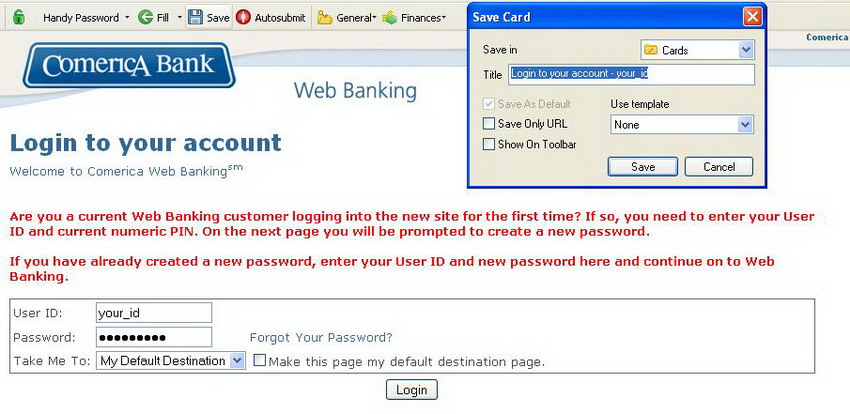
From now on, Comerica Bank Login will always be performed automatically and will never require your intervention. Moreover, Handy Password can work as a bookmark manager, making a direct bookmark to your personal page in Comerica in IE/Firefox toolbar.
Read more about automatic login and other features of Handy Password manager.
Read more about Bank of America Online Banking, National bank login, Orchard Bank login and RBC login.
 |  |  |











