Google AdWords Login Automatically
Login to your Google AdWords with a single click using a Password manager
To login to Google AdWords with a single click, please do the following:
- Open an Internet Explorer window;
- Download password manager;
- Turn on Handy Password toolbar in Internet Explorer/Firefox;
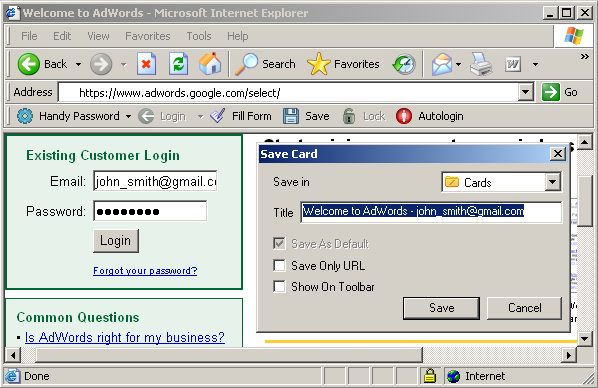
- Go to the Google AdWords login page;
- Enter your Email and Password;
- Click the "Save" button on the Handy Password toolbar;
- Check the "Show on Toolbar" checkbox;
- Press "Enter".
Now, to login to Google AdWords with a single click, just press the "Welcome to AdWords - username" button on the Handy Password Internet Explorer toolbar.
Handy Password is also called a bookmark manager, because "Welcome to AdWords - username" button appears on IE or Firefox browser toolbar like bookmark and contains not only filled form fields, but also a site url, so you can at once enter a site and login to it.
You can also login to other Google services (Google Mail, Google AdSense, Google Sitemaps, Google Answers) with Handy Password.
Read more about ways of usage, benefits or features of Handy Password.
See also:
Google mail login
Back to Screenshots List
 |  |  |
















