Gmail Sign In: Get over the difficulties with Google mail account
Google email is an internet email platform, powered by the one of the most famous corporation Google.com. The gmail login allows you to create an account and make all the operations more easier such as surfing information in the internet, doing business, keep in touch with all the people that you need more easier.
This article would helps you to perform all the necessary activities with gmail sign in, Google mail login and get over all the difficulties with gmail account settings.
Gmail Login: How to Create an Account
First of all Google mail offers you to create an account, in order to do this, you need to perform several steps:
- Go to the official page of Google accounts (gmail.com);
- Click at "Create account";
- Then you need to enter the following information:
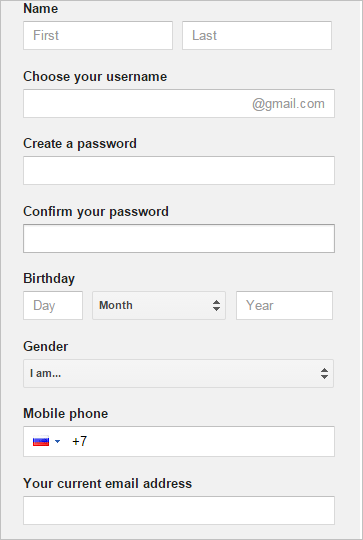
- Your Name (First and Last Name);
- Choose your Username (think out your Username: you can use letters, numbers and periods);
- Create and then confirm your password;
- Enter your Birthday data;
- Choose your Gender;
- Enter your mobile phone;
- Input your current email address;
- Type the text from the picture (in order to prove that you are not a robot) click t "get a new challenge" if you cannot see;
- Choose you location;
- Please read carefully given Term of Service and Privacy Policy and then click "I agree";
- Complete the registration.
Images from mail.google.com
Gmail Sign In: Can't get access to your account?
If you cannot get access to your account, for this may be several reasons:
- You don't know your password,
- You don't know your username,
- You having other problems signing in.
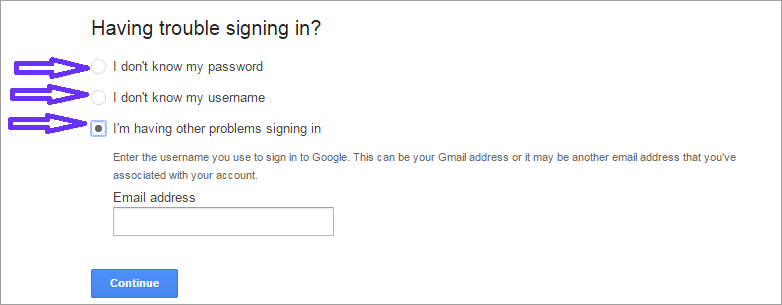
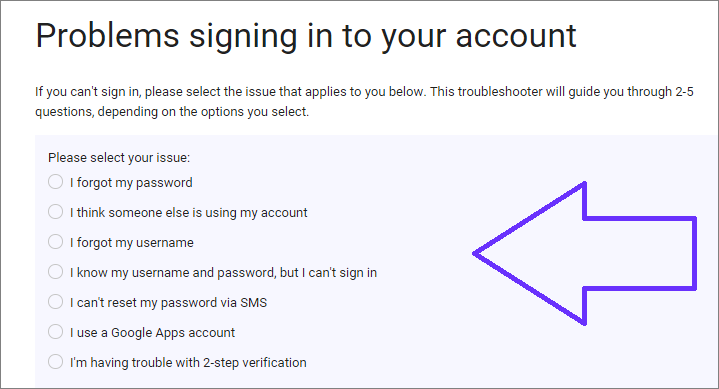
In case you have one of this problem, you need to click at "Help" in the gmail.com login page, them choose the problem, that you face:
If you forgot your password:
- Choose "I don't know my password",
- Then enter your email address that you use to sign in to Google (this can be your Gmail address, your Google Apps email address, or another email address associated with your account),
- After this you need to think up new password.
If you forgot your username:
- Choose "I don't know my username",
- Select the method of recovery that you prefer,
- Enter the name on the account,
- Confirm that you are not a robot.
If you having other problems signing in click at this title and enter your email address the and specifically what problem do you have.
Google Mail Help: Get a Contact
If you still face any difficulties with gmail log in, pleae contact the Tech Support system of Google mail. In order to receive a help, do the following:
- Click at "Help" at the bottom of the official Google mail web suite.
- Then choose the problem that you have and follow the given instructions.
We wish you a pleasant use of Google Mail!
Google Mail: Login Automatically
Login to Google Mail automatically with a handy password manager.
To login to Google Mail with a single click please do the following:
- Download password manager;
- Turn on Handy Password toolbar in Internet Explorer/Firefox;
- Go to the mail.google.com;
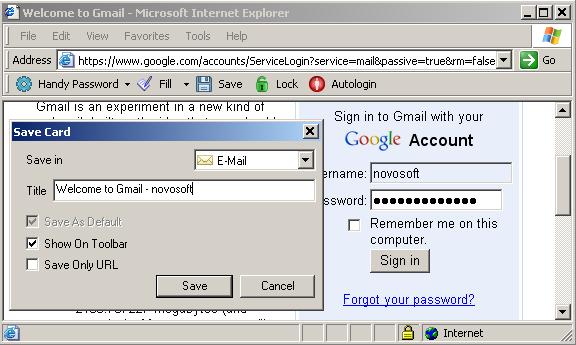
- Type in your Google mail address and password;
- Click the "Save" button on the Handy Password toolbar;
- Check the "Show on Toolbar" checkbox in the opened "Save card" dialog;
- Press "Enter".
From now, to login to Google mail automatically, just click on the "Welcome to Gmail" button on the Handy Password toolbar.
Handy Password is also called a bookmark manager, because "Welcome to Gmail" button appears on IE or Firefox browser toolbar like bookmark and contains not only filled form fields, but also a site url, so you can at once enter a site and login to it.
Read about automatic login, autosave passwords and other features of Handy Password.
If you are really care about your Gmail data safety, we suggest you solution for backup of your mail messages directly from the mail server. Handy Backup software performs backup of Gmail easily and surely.
See also:
How to create an eBay account
Google Adwords screenshot
Lycos mail screenshot
 |  |  |
















