Ebay Login: Create new Account and Sign in
eBay account login is your starting point in the world of fashion, chip products and great variety of choice, Electronics, Collectibles and Art, different stuffs for Home and Garden Sporting Goods, Motors, Daily Deals and even more.
If you don't know how create an eBay Account and sign into my eBay Account, or you are experiencing problems with login eBay this article is exactly what you are looking for: here you could find easy instructions about sign in issues.
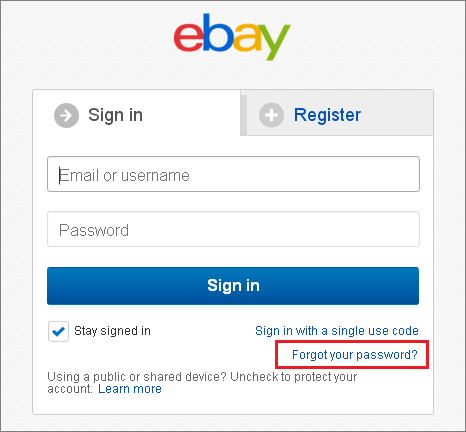
My eBay Account Sign in: overcoming the difficulties
So as to sign in eBay account you need to click at "Sign in" at the top the screen of the official eBay website. Then you need to enter your Email or Username and Password. You may also click at "Stay signed in" if you enter from your personal computer in order not to enter each time your personal data.
Furthermore, you may login to your eBay account with the help of a single use code: click on the appropriate title in the section Sign in, then enter Username or email and get your code.
My eBay login: recovery access to your account
In case you cannot get access to your account because you forgot a password, click at appropriate title in the section "Sign in". Then please enter your Email or Username and restore your password (think out a new password and enter it).
Images from eBay.com
Create an eBay account: easy instructions
If you are a newcomer in eBay system and want to become a part of it, firstly, you need to start a new eBay account. In order to open account and perform eBay login to my Account, please, do the following:
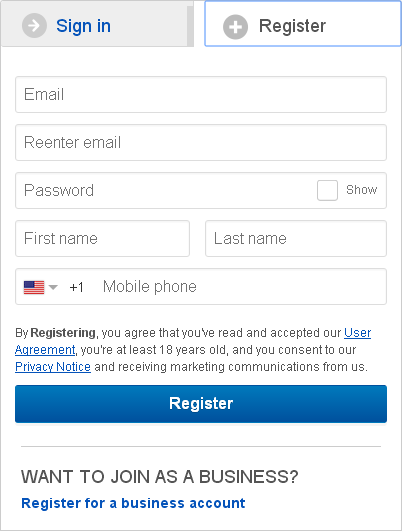
- Click at "Register" at the top the screen of the official eBay website;
- Enter and reenter your Email;
- Enter your Password, First and Last Name;
- Enter your mobile phone (choose your country by selecting the flag of your country);
- Read carefully the User Agreement and Privacy Notice;
- Complete the registration.
Moreover, you may also register for an eBay business account, in order to do this click at appropriate title in the section of "Registration", then, please, enter the following information about your business details:
- Choose your country;
- Enter your Business name (or your trade name);
- Set your Business address (City and State);
- Input your ZIP code;
- Enter the Business phone number and Extension.
- The First and the Last Name;
- Contact address: City, State, Zip Code, Contact phone number and Extension (click at "Same as your business information" if it is coincide);
- Email (eBay Tech Support system will use this email if they need to contact your business).
- Business username (This will be your business's unique identity on eBay);
- Enter a Password and confirm it;
- Press "Create account and continue".
Also, please, enter your Contact information:
Please, think out the Username and password:
How to create an eBay seller account?
If you want to open a seller account, firstly, you need to register for an eBay account (if you don't have), then confirm your contact information using a PIN that Tech Support system send you and choose PayPal, a credit or debit card, or a bank account as an automatic payment method to pay any future seller fees and buyer refunds.
Sign in to eBay: do you need a help?
In case you still have any difficulties with eBay account, please, contact the eBay Tech Support system: click at "Contact Us" at the bottom of the screen in the section of registration. Then choose the related help topics with theme that bothering you. Also you may contact by email: click at "Send us an email" and write your question.
eBay Account: Login Automatically
Login to eBay account automatically with a handy password manager.
To login to eBay account with a single click, please do the following:
- Download password manager;
- Turn on Handy Password toolbar in Internet Explorer/Firefox;
- Go to the eBay account login page;
- Type in your eBay account and password;
- Click the "Save" button on the Handy Password toolbar;
- Click "Cancel" or "Esc" once to cancel a card, saving the contents of the "Search" field;
- Check the "Show on Toolbar" checkbox in the opened "Save card" dialog;
- Press "Enter".
From now, to login to eBay account automatically, just click on the "eBay Sign in" button on the Handy Password toolbar.
Handy Password is also called a bookmark manager, because "eBay Sign in" button appears on IE or Firefox browser toolbar like bookmark and contains not only filled form fields, but also a site url, so you can at once enter a site and login to it.
See also:
Verizon mail login
Cox mail login
PayPal account login
 |  |  |
















