Context Menu
The Context Menu appears when you right-click inside a webpage. Use it as an additional way to launch Handy Password. All actions which may be done from this menu are described at password toolbar page.
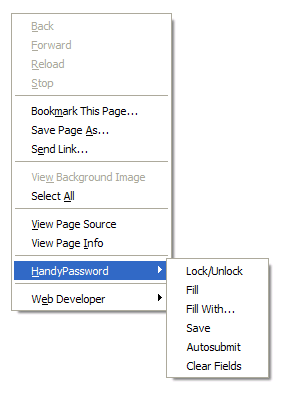
The Handy Password keeper part of the context menu is:
- Lock - locks/unlocks the Handy Password;
- Fill - fills in the webpage fields with the default card.
- Fill with - selects a card to fill in the webpage if there is more than one for this web-page;
- Save - saves the current web-form details into a card.
- Autosubmit - toggles the Autosubmit option;
- Clear fields - clears all fields (works only in Firefox).
 |  |  |


















