Find Dialog
Find dialog is aimed to help in searching a card in the Card Database by its contents. This dialog is available at "Service" --> "Find..." of the Top Menu.
The find dialog in Handy Password looks like this
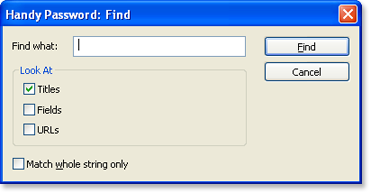
If you want to find a specific card, it is possible to do it here using several options.
It is possible to search for a card by a title, field contents and an URL. Just enter a string you know the card has in the corresponding field, and press "Enter".
You can also make Handy Password search for an exact match by checking the "Match whole string only" checkbox.
To continue search for other cards with the same content select Service->Find Next in the Top Menu.
 |  |  |


















